

Roll Out EHS Software Faster with Intelex Essentials’ DIY Implementation Manager
December 8, 2025
4 minute read

Safety leaders in growing organizations often face the same challenges: limited time, tight budgets, and small teams.
And while point solutions seem great for quick setups, they often don’t integrate with each other, resulting in poor user experience and manual interventions.
Intelex Essentials provides the core safety features needed to protect people, meet compliance requirements, and scale as your organization grows. And it delivers these capabilities without the cost or complexity of enterprise-level solutions.
See what’s included in Intelex Essentials.
One of Intelex Essentials’ best features is that you can set it up yourself. Here are four ways its DIY implementation manager stands out from other safety management software.
Are you ready to implement professional EHS software independently, without consultants, IT support, or lengthy projects? Get a demo of Intelex Essentials today.
Self-implementation with step-by-step guidance
The Intelex Essentials implementation manager simplifies the setup from an intimidating technical project into a structured, manageable journey that you can complete at your own pace. Instead of seeing a complex admin panel full of settings, you see a curated sequence of implementation tasks organized into a logical progression.
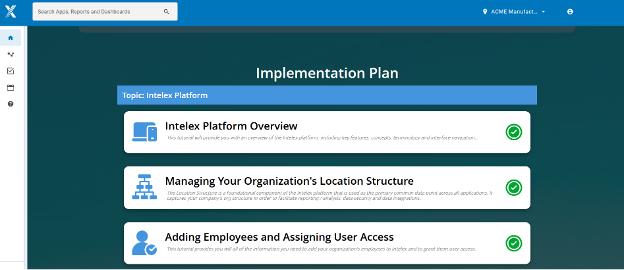
The implementation manager breaks setup into three clear phases:
- Platform foundations: Choose which applications to use, set up your organization’s locations, and add employees and assign user access.
- Module-specific tasks: Each task follows the same pattern, making setup easy to learn. You begin with a short video explaining the feature and its importance. Then, a step-by-step tutorial video shows you which fields to fill out and what each option does.
- Go-live preparation: One of your final steps before Go Live is to assign the roles for each module-specific workflow. Roles are assigned by location, enabling individuals to take responsibility in each location as needed.
Safety managers without technical backgrounds often complete the full system setup in 4-6 weeks, without needing any professional services. For organizations taking a phased rollout approach, implementation can be even faster.
Get users started faster with pre-configured, ready-to-use applications
Each Intelex Essentials application module is easy to set up and quick to launch. Most can be used out of the box or require only a small amount of setup, allowing users to start logging incidents, observations, or inspections as soon as the basic setup is complete.
This approach helps companies in three ways:
- Phased implementation strategy: Users can focus on the most important modules first, instead of waiting for everything to be ready. For example, you might set up incident tracking first, then add observations and meetings management later.
- Better training experience: Safety leaders can train users on a system set up for their needs, not just a demo site, making training sessions more effective.
- Adjust based on feedback: Safety leaders can make changes using real user feedback, avoiding the mistake of over-configuring before knowing what works best.
Keep your project moving with visual progress tracking
Without consultant support, it’s easy to lose momentum, miss important steps, or launch with incomplete modules that cause problems later.
Most platforms don’t show how complete your setup is, so users aren’t sure if they’re ready to go live.
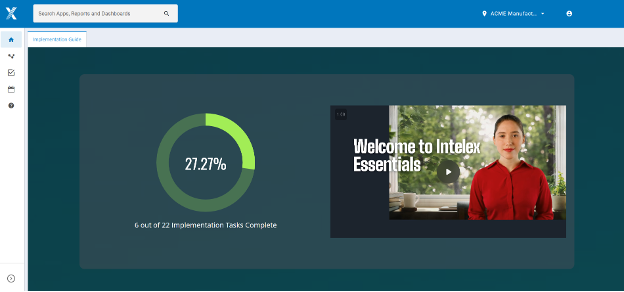
The implementation manager tracks your progress clearly, showing how much is done in each module, what tasks are left, and key milestones to avoid incomplete setups.
Build your system expertise as you set things up
Learning a new safety system can be tough, and it often takes weeks or months for admins to feel confident making changes.
With video tutorials for each task, you learn how the system works and why each setting is important.
For example, before you set up locations, you watch a short video that explains key ideas, how location hierarchies help with reporting, and how location-based filtering works. These videos are 3-5 minutes long and focus on both the reasons and the steps.
The built-in training also helps you keep improving your system over time.
As your safety program evolves and you want to adjust workflows or add new modules, you can return to the implementation manager videos to refresh your knowledge or learn about features you didn’t initially implement.
The implementation manager stays available after launch, so you always have a resource for documentation and training.
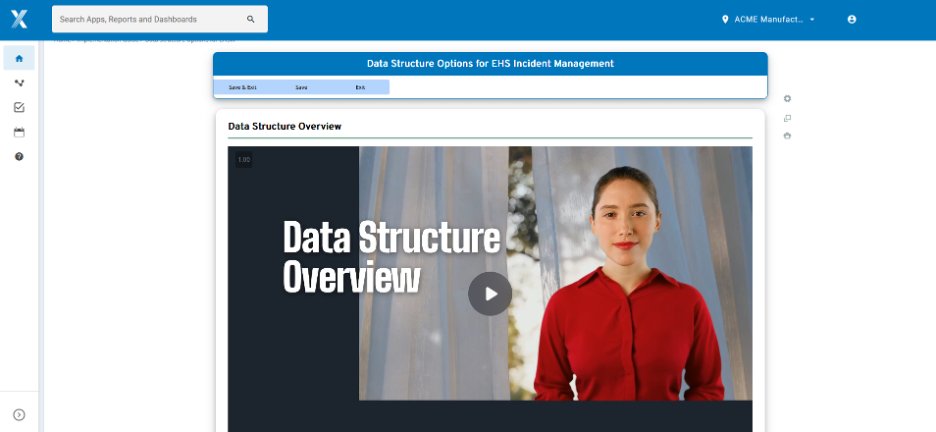
See Intelex Essentials in action
Traditionally, buying safety software means choosing between expensive, time-consuming consultant-led setups or self-service options that save money but are hard to use.
The Intelex Essentials implementation manager gives you a better self-service experience and helps you go live faster than consultant-led options.
With this approach, non-technical EHS managers can set up professional safety software on their own in 4-6 weeks. This usually takes $20,000-$100,000 in consulting fees and 3-6 months, but now you can do it faster and build your own expertise for long-term success.
See for yourself how easy it is to set up professional EHS software with step-by-step guidance. Schedule a personalized demo now.